Hibernate option is not available by default in Windows XP. To enable follow this steps -
1. Go to Start > Settings > Control Panel. Make sure to open the Classic View.
2. Open Power Options.
3. Check if there is a tab labeled Hibernate. Open the Hibernate tab & check the Enable Hibernation checkbox. click Apply and Ok. Pic-1 given below.

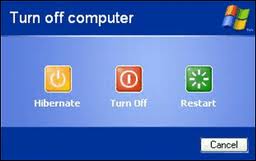
4. Now, you will see in the Turn Off Computer dialog box, press the Shift Key, the Stand By option will change to Hibernate while you hold the Shift. Pic-2 given below.
1. Go to Start > Settings > Control Panel. Make sure to open the Classic View.
2. Open Power Options.
3. Check if there is a tab labeled Hibernate. Open the Hibernate tab & check the Enable Hibernation checkbox. click Apply and Ok. Pic-1 given below.

4. Now, you will see in the Turn Off Computer dialog box, press the Shift Key, the Stand By option will change to Hibernate while you hold the Shift. Pic-2 given below.
Note: If not able to see the Hibernate tab, then Hibernation is probably not supported in your computer.
Comments